工具和函数调用是什么意思
在一些大语言模型(LLM)中,除了文本生成之外,还具备触发
工具(tools)或函数调用(function calling)
的能力,这才能让 LLM 被赋予它与外部世界交互的能力。
2023年 OpenAI 在 GPT API 中推出了Function Call,类似传统 API
设计思想,让 LLM 按 JSON 格式填写参数,由后端调用接口。这一机制允许 LLM
在需要时调用一个或多个由开发者预先定义的工具。工具的形式可以非常多样,例如执行网页搜索、调用外部
API、运行特定代码等。
模型被训练成能够理解函数描述,并精准输出符合 JSON Schema
的参数。它的输出不是给用户看的,而是给程序解析的。
而 Tool Calling 是一个更广义的、与具体模型实现无关的概念,通常在
Agent 中被提到。在 AI Agent 或 LLM
应用中,我们给模型提供一组工具(Tool),模型可以自主决定什么时候 、调用哪个工具 以及用什么参数 ,从而完成一个复杂任务。工具通常情况下是可以被模型调用的函数。
举个例子:我们知道 LLM
在数学计算方面并不总是可靠。如果应用场景中偶尔涉及数学问题,可以为模型提供一个数学计算工具。当请求中声明了这一工具后,LLM
就能在必要时选择调用它。例如,面对一个数学问题时,模型可能会先调用数学工具进行计算,然后再基于结果生成最终答案。
这样一来,工具调用机制不仅弥补了 LLM
的局限性,还显著增强了其在实际应用中的可扩展性与准确性。
而且,随着 Agent 框架发展起来,可以由 Agent
根据目标自主决策使用什么工具,完成多步规划与工具调用。
但各家工具不兼容、生态碎片化。为了解决这一问题,Anthropic在2024年提出了
MCP 协议,将 LLM
连接外部数据源和工具抽象成统一协议,成为各大模型通用标准。
最大问题就是 Function Calling
可以理解为大语言模型(LLM)的一项原生能力 。它让模型在理解用户意图后,能够决定需要调用哪个外部工具,并生成一个结构化的调用指令,通常是
JSON
Tools Calling 可以看作是 Function Calling
的扩展和升级 。它将“工具”的概念从单一的函数扩展到了更广泛的实体。
Function Calling 关注怎么调用 ,而 Tools Calling
关注调用什么 ,也就是工具本身。
Tools Calling
支持更复杂的交互,例如有状态的工具 、嵌套调用 (一个工具调用另一个Agent)等。
Function Call 是调用一个函数,而 Tool Call
是使用一个工具。这个工具可以是一个函数、一个数据库、一个完整的API,甚至另一个AI
Agent。
其实 Function Calling 是实现 Tool Calling
的一种具体协议 。对于 OpenAI 模型,Tool Calling 能力就是通过其
Function Calling 接口实现的。
而且 Tool Calling 的范畴更大:即使模型没有原生的 function calling
能力,我们也可以通过提示词工程(如 ReAct 模式)让模型输出特定格式(如
{"tool":"xxx","args":{...}}),然后由外部解析执行,这也叫
Tool Calling。
简单来说:
Function Calling 是模型能输出调用请求的能力;Tool Calling
是系统利用这种能力让模型使用工具的整套机制。
MCP(Model Context
Protocol,模型上下文协议)是一个开放的标准协议 ,所以说他和上面两个内容都不在一层中,MCP
是协议层中的内容。它的目标是统一AI应用与外部数据源和工具之间的连接方式。MCP实现了工具与AI模型的解耦 ,让工具集成变得更标准、更开放
在没有 MCP 时,为每个 AI
模型(如GPT-4、Claude)接入同一个工具,需要写多份不同的适配代码。MCP
就像 AI 界的通用接口,工具提供方只需按MCP标准封装一次(成为MCP
Server),任何支持 MCP 的 AI 客户端都能直接调用。
Function Calling、Tools Calling 和 MCP 在AI系统共同协作:
Function
Calling(决策层) :负责思考与决策 ,输出调用指令。Tools
Calling(抽象层) :提供更丰富的工具定义 ,扩展AI的能力边界。MCP(协议层) :建立统一的通信标准 ,让决策和工具能够标准化对接。
Function Calling 的工作原理
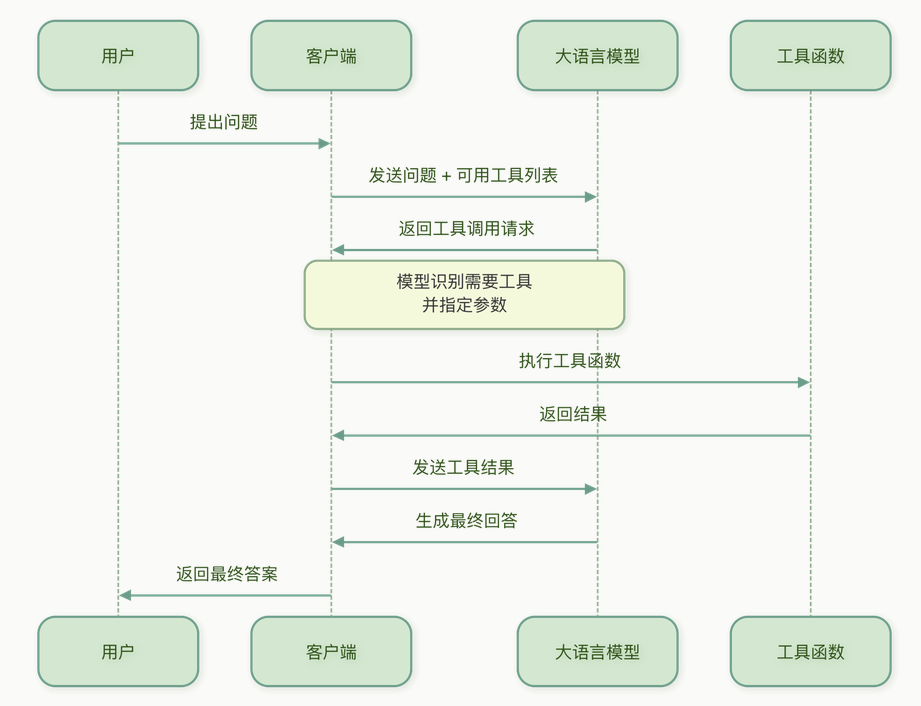
Function Calling 的基本流程如下
image-20260708160510930
首先,模型商会经过大量的训练,通过大量这种多轮对话的训练,模型学会了:
何时调用 :当用户问题无法仅靠内置知识回答,且某个函数的描述与之匹配时,应调用函数而不是瞎编。调用哪个 :从给定的函数列表中,选出最相关的那个。如何填参数 :从用户问题和对话历史中抽取合适的参数值,并按照函数定义的类型/格式要求输出。
当你的应用实际调用模型 API 时,Function Calling
是一个多步交互 的过程,通常需要两次模型请求。
发送请求,带上工具定义
你发出的请求不再只有消息列表,还附带一个 tools
数组,描述当前可用的函数及其参数 JSON Schema。例如:
1
2
3
4
5
6
7
8
9
10
11
12
13
14
15
16
17
18
{ "model" : "gpt-4" , "messages" : [{"role" : "user" , "content" : "北京天气怎么样?" }], "tools" : [{ "type" : "function" , "function" : { "name" : "get_weather" , "description" : "获取指定城市的天气" , "parameters" : { "type" : "object" , "properties" : { "city" : {"type" : "string" , "description" : "城市名" } }, "required" : ["city" ] } } }] }
模型决策并生成“调用指令”
模型处理这段上下文,它需要回答:“我应该生成普通文本,还是调用一个工具?”这是一个二分类决策。如果它决定调用工具,就开始生成工具调用的结构化输出。
你的代码(比如一个 LangChain4j 代理)接收到这个响应,提取
name 和
arguments,反射调用对应的本地函数:
将结果发回模型,获得最终回答
你再次调用模型 API,消息历史中追加两样东西:
刚才助手生成的 tool_calls
消息,告诉模型“你刚才要求调用了这个工具”
一个新的 tool 角色消息,包含函数执行结果:
两种抽象级别
LangChain4j 提供了两种使用工具的抽象级别:
低级 :使用 ChatModel 和
ToolSpecification API高级 :使用 AI Services 及
@Tool 注解的 Java 方法
低级工具 API
在低级别中,你可以使用 ChatModel 的
chat(ChatRequest) 方法。StreamingChatModel
中也有类似的方法。
在创建 ChatRequest 时,可以指定一个或多个
ToolSpecification。ToolSpecification
是一个包含工具全部信息的对象,一般,尽可能提供详尽信息:清晰的名称、完整的描述、每个参数的说明等
工具的 name
工具的 description
工具的 parameters 及其描述
1
2
3
4
5
6
7
8
9
ToolSpecification toolSpecification = ToolSpecification.builder() .name("getWeather" ) .description("Returns the weather forecast for a given city" ) .parameters(JsonObjectSchema.builder() .addStringProperty("city" , "The city for which the weather forecast should be returned" ) .addEnumProperty("temperatureUnit" , List.of("CELSIUS" , "FAHRENHEIT" )) .required("city" ) .build()) .build();
当你有一个 List<ToolSpecification>
时,可以调用模型:
1
2
3
4
5
6
ChatRequest request = ChatRequest.builder() .messages(UserMessage.from("What will the weather be like in London tomorrow?" )) .toolSpecifications(toolSpecifications) .build(); ChatResponse response = model.chat(request);AiMessage aiMessage = response.aiMessage();
如果 LLM 决定调用工具,返回的 AiMessage
会包含toolExecutionRequests 字段。
每个 ToolExecutionRequest 应包含:
工具调用的 id(注意:某些 LLM 提供商,如
Google、Ollama,可能省略该 ID)
要调用的工具名称,例如:getWeather
调用参数,例如:{ "city": "London", "temperatureUnit": "CELSIUS" }
你需要根据 ToolExecutionRequest 手动执行工具。
如果你想把执行结果返回给 LLM,需要为每个
ToolExecutionRequest 创建一个
ToolExecutionResultMessage,并与之前的所有消息一起发送:
1
2
3
4
5
6
7
String result = "It is expected to rain in London tomorrow." ;ToolExecutionResultMessage toolExecutionResultMessage = ToolExecutionResultMessage.from(toolExecutionRequest, result);ChatRequest request2 = ChatRequest.builder() .messages(List.of(userMessage, aiMessage, toolExecutionResultMessage)) .toolSpecifications(toolSpecifications) .build(); ChatResponse response2 = model.chat(request2);
流式的也类似,如果 LLM 决定调用工具,通常会先多次触发
onPartialToolCall(PartialToolCall) 回调,最终触发
onCompleteToolCall(CompleteToolCall),表示该工具调用的流式输出结束。
很明显,这种方式既不优雅,甚至都不自动,所以我们几乎不使用
高级工具 API
在更高层的抽象级别,你可以给任意 Java 方法添加 @Tool
注解,并在创建 AI
Service 时指定它们。使用 @Tool
注解的方法可以是静态的或非静态的,可以是任意可见性(public、private
等)
1
2
3
4
5
6
7
@Tool("Calculates the square root of a non-negative number") public double sqrt (@P("A non-negative number") double x) { if (x < 0 ) { throw new IllegalArgumentException ("Cannot compute square root of a negative number: " + x); } return Math.sqrt(x); }
任何带有 @Tool 注解并在构建 AI Service
时显式指定 的方法,都可以被 LLM 执行
AI Service 会自动将这些方法转换为
ToolSpecification,并在每次与 LLM 交互时包含在请求中。
当 LLM 决定调用工具时,AI Service
会自动执行相应方法,方法的返回值(如果有)会自动发送回 LLM。
带有 @Tool 注解的方法可以返回任意类型,包括
void。
如果方法返回类型为 void,则执行成功后会向 LLM 返回
"Success" 字符串。
如果返回类型为 String,则原样返回字符串给 LLM。
其他返回类型会在返回前自动转换为 JSON 字符串
而且如果一个使用 @Tool 注解的方法抛出了
Exception,则异常的消息 (e.getMessage())
会作为工具执行的结果传递给 LLM。
这样,LLM 就有机会修正错误并选择是否重试。
LangChain4j 对 Tool Calling
的支持非常优雅,且屏蔽了不同模型之间的差异。
定义工具
使用 @Tool 注解来声明一个 Java
方法为可供模型调用的工具,并用 @P 描述参数。
@Tool 注解有两个可选字段:
name:
工具的名称。如果未提供,则方法名会作为工具名。value: 工具的描述。
方法的参数可以选择性地使用 @P 注解。@P
注解有两个字段:
value: 参数的描述。必填。required: 参数是否必填,默认为
true。可选
1
2
3
4
5
6
7
class WeatherTools { @Tool("获取指定城市的实时天气") String getWeather (@P("城市名称") String city) { return city + "今天晴朗,25度" ; } }
类和字段的描述可以使用 @Description 注解来指定:
1
2
3
4
5
6
7
8
9
10
11
12
13
14
@Description("要执行的查询") class Query { @Description("要选择的字段") private List<String> select; @Description("过滤条件") private List<Condition> where; } @Tool Result executeQuery (Query query) { ... }
默认情况下,所有工具方法参数都被视为 必填 。这意味着
LLM 必须为这些参数生成值,但是有时候这并不需要,可以通过在参数上使用
@P(required = false),可以将其设为可选:
1
2
3
4
@Tool void getTemperature (String location, @P(value = "Unit of temperature", required = false) Unit unit) { ... }
复杂参数的字段和子字段默认也为 必填 。可以通过
@JsonProperty(required = false) 将其设为可选:
1
2
3
4
5
6
record User (String name, @JsonProperty(required = false ) String email) {}@Tool void add (User user) { ... }
模型集成(Function Calling)
LangChain4j 为不同模型提供了统一接口。对于支持原生 function calling
的模型(如 OpenAI),框架会自动将 @Tool 方法的签名转换成
OpenAI 所需的 tools JSON Schema,并解析模型返回的
tool_calls,执行 Java 方法,再把结果送回模型
1
2
3
4
5
6
7
8
9
10
11
12
13
OpenAiChatModel model = OpenAiChatModel.builder() .apiKey("..." ) .modelName("gpt-4" ) .build(); Assistant assistant = AiServices.builder(Assistant.class) .chatLanguageModel(model) .tools(new WeatherTools ()) .build(); String answer = assistant.chat("北京明天天气怎么样?" );
对于不支持原生 function calling 的模型 ,LangChain4j
可以切换到“提示词模式”,在系统消息中插入工具描述和格式要求,然后从模型回复中解析工具调用指令。开发者无需修改工具定义
记忆处理
如果 AI Service 方法中有使用 @MemoryId
注解的参数,那么你也可以在 @Tool 方法的参数上使用
@ToolMemoryId。
这样,AI Service 方法提供的值会自动传递给 @Tool
方法。
而当需要多步推理或调用多个工具时,LangChain4j 提供了
ToolExecutionRequestHandler 和 ReActAgent
等方式来管理思考-行动-观察循环,直到模型认为可以给出最终答案。这个我们下面提
简单来说,在 LangChain4j 中 Function Calling 和 Tools Calling
是同一个意思 ,都指让 LLM 调用外部工具的能力。
实际上,上面展示的低级 API,就手动构建 ToolSpecification
对象那种,是给人一种更偏向于 Function Calling 的感觉,官方推荐使用
高级别 API ,实际上,它更符合 Java
开发习惯,能让你专注于业务逻辑。
剩下的想不出啥想说的了
实际例子使用 LangChain4j
中的工具调用
低级API
两种 API 的关系是这样的
1
2
3
4
5
6
7
8
9
10
11
┌─────────────────────────────────────────────────────────────┐ │ 高级 API(AiServices) │ │ 你只写 @Tool 方法 → 框架自动完成下面 4 步 │ └─────────────────────────────────────────────────────────────┘ │ │ 内部封装了 ↓ ▼ ┌─────────────────────────────────────────────────────────────┐ │ 低级 API(ChatModel 直接调用) │ │ 步骤1 → 步骤2 → 步骤3 → 步骤4 (你手动控制每一步) │ └─────────────────────────────────────────────────────────────┘
高级 API 是黑盒的自动化,低级 API 是白盒的手工组织,理解低级 API
就懂了 Tool Calling 的底层原理。
完整的代码示例如下
1
2
3
4
5
6
7
8
9
10
11
12
13
14
15
16
17
18
19
20
21
22
23
24
25
26
27
28
29
30
31
32
33
34
35
36
37
38
39
40
41
42
43
44
45
46
47
48
49
50
51
52
53
54
55
56
57
58
59
60
61
62
63
64
65
66
67
68
69
70
71
72
73
74
75
76
77
78
79
80
81
82
83
84
85
86
87
88
89
90
91
92
93
94
95
96
97
98
99
100
101
102
103
104
105
106
107
108
109
110
111
112
113
114
115
116
117
118
119
120
121
public Map<String, Object> lowLevelDemo (String userMessage) { Map<String, Object> result = new LinkedHashMap <>(); List<Map<String, Object>> steps = new ArrayList <>(); List<ToolSpecification> toolSpecs = new ArrayList <>(); toolSpecs.addAll(ToolSpecifications.toolSpecificationsFrom(Calculator.class)); toolSpecs.addAll(ToolSpecifications.toolSpecificationsFrom(WeatherTool.class)); List<ChatMessage> messages = new ArrayList <>(); messages.add(SystemMessage.from(""" You are a helpful assistant with access to calculation and weather tools. When a user asks a math question, use the calculator tools. When a user asks about weather, use the weather tools. Always use tools when appropriate — don't guess answers you can compute.""" )); messages.add(UserMessage.from(userMessage)); ChatResponse response = chatModel.chat(ChatRequest.builder() .messages(messages) .toolSpecifications(toolSpecs) .build()); AiMessage aiMessage = response.aiMessage(); messages.add(aiMessage); Map<String, Object> step1 = new LinkedHashMap <>(); step1.put("step" , 1 ); step1.put("title" , "发送请求(用户消息 + Tool 声明)" ); step1.put("toolCount" , toolSpecs.size()); step1.put("toolNames" , toolSpecs.stream() .map(ToolSpecification::name).toList()); step1.put("hasToolExecutionRequests" , aiMessage.hasToolExecutionRequests()); if (!aiMessage.hasToolExecutionRequests()) { step1.put("textResponse" , aiMessage.text()); } steps.add(step1); List<Map<String, Object>> toolCalls = new ArrayList <>(); if (aiMessage.hasToolExecutionRequests()) { for (ToolExecutionRequest toolRequest : aiMessage.toolExecutionRequests()) { Map<String, Object> call = new LinkedHashMap <>(); call.put("toolName" , toolRequest.name()); call.put("arguments" , toolRequest.arguments()); toolCalls.add(call); Map<String, Object> step3 = new LinkedHashMap <>(); step3.put("step" , 3 ); step3.put("title" , "执行 Tool: " + toolRequest.name()); step3.put("arguments" , toolRequest.arguments()); String executionResult; try { executionResult = executeTool(toolRequest); step3.put("status" , "success" ); } catch (Exception e) { executionResult = "Error executing tool: " + e.getMessage(); step3.put("status" , "error" ); step3.put("error" , e.getMessage()); } step3.put("executionResult" , executionResult); step3.put("resultType" , executionResult.startsWith("{" ) ? "JSON" : "text" ); steps.add(step3); messages.add(ToolExecutionResultMessage.from(toolRequest, executionResult)); } } Map<String, Object> step2 = new LinkedHashMap <>(); step2.put("step" , 2 ); step2.put("title" , "LLM 返回 ToolExecutionRequest(调用意图)" ); step2.put("toolCalls" , toolCalls); step2.put("callCount" , toolCalls.size()); steps.add(step2); Map<String, Object> step4 = new LinkedHashMap <>(); step4.put("step" , 4 ); step4.put("title" , "将 Tool 执行结果发回 LLM,生成最终回答" ); if (!toolCalls.isEmpty()) { ChatResponse finalResponse = chatModel.chat(ChatRequest.builder() .messages(messages) .toolSpecifications(toolSpecs) .build()); AiMessage finalAiMessage = finalResponse.aiMessage(); if (finalAiMessage.hasToolExecutionRequests()) { step4.put("note" , "LLM 请求了额外的工具调用(Tool Chaining)," + "这里仅展示第一轮,实际框架会循环直到 LLM 输出纯文本" ); } if (finalAiMessage.text() != null ) { step4.put("finalAnswer" , finalAiMessage.text()); } } else { step4.put("note" , "LLM 没有请求任何工具调用,直接用内置知识回答了问题" ); if (aiMessage.text() != null ) { step4.put("finalAnswer" , aiMessage.text()); } } steps.add(step4); result.put("mode" , "低级 API(手动控制完整的 Function Calling 生命周期)" ); result.put("userMessage" , userMessage); result.put("totalMessages" , messages.size()); result.put("steps" , steps); return result; }
首先,我们需要把 @Tool 注解变成 LLM 能懂的 JSON
Schema
1
2
3
List<ToolSpecification> toolSpecs = new ArrayList <>(); toolSpecs.addAll(ToolSpecifications.toolSpecificationsFrom(Calculator.class)); toolSpecs.addAll(ToolSpecifications.toolSpecificationsFrom(WeatherTool.class));
核心
API:ToolSpecifications.toolSpecificationsFrom(Class<?>)
这是低级 API 的第一个关键方法。它通过 Java
反射 扫描传入类上所有 @Tool
注解的方法,将每个方法转换为一个 ToolSpecification
对象。
ToolSpecification 本质上就是 OpenAI Function
Calling 格式的 JSON
Schema ,这个上面也提到了,包含三个关键信息:
字段
来源
作用
name@Tool 的 name
属性,默认取方法名LLM 用它来标识”我要调用哪个工具”
description@Tool 的 value
属性LLM 据此判断”这个工具是干什么的”
parameters方法参数 + @P 注解 → JSON
Schema
LLM 据此知道”这个工具需要什么参数”
以 Calculator.add() 为例:
1
2
3
@Tool("Adds two integers and returns the sum") public int add (@P("The first number") int a, @P("The second number") int b) { ... }
ToolSpecifications.toolSpecificationsFrom()
会自动生成等价于以下 JSON Schema 的 ToolSpecification:
1
2
3
4
5
6
7
8
9
10
11
12
{ "name" : "add" , "description" : "Adds two integers and returns the sum" , "parameters" : { "type" : "object" , "properties" : { "a" : { "type" : "integer" , "description" : "The first number" } , "b" : { "type" : "integer" , "description" : "The second number" } } , "required" : [ "a" , "b" ] } }
所以说,@Tool + @P 注解 = 声明式 JSON
Schema 生成。写 Java 注解框架就能生成 LLM 能消费的函数签名。
然后,发送用户消息 + Tool 声明给 LLM
1
2
3
4
5
6
7
8
9
10
List<ChatMessage> messages = new ArrayList <>(); messages.add(SystemMessage.from(""" You are a helpful assistant with access to calculation and weather tools. ...""" ));messages.add(UserMessage.from(userMessage)); ChatResponse response = chatModel.chat(ChatRequest.builder() .messages(messages) .toolSpecifications(toolSpecs) .build());
核心 API:ChatRequest.Builder
ChatRequest 是 LangChain4j 中发送给 LLM
的完整请求封装 ,它的 Builder 提供了两个与 Tool Calling
直接相关的方法:
Builder 方法
类型
说明
.messages(List<ChatMessage>)List<ChatMessage>对话历史(至少包含 SystemMessage +
UserMessage)
.toolSpecifications(List<ToolSpecification>)List<ToolSpecification>告诉 LLM “你可以调用这些工具”
这一步发送到 LLM 的完整 payload 结构大致就是这样
1
2
3
4
5
6
7
8
9
10
11
12
{ "model" : "deepseek-v4-pro" , "messages" : [ { "role" : "system" , "content" : "You are a helpful assistant..." }, { "role" : "user" , "content" : "What is 15 + 27?" } ], "tools" : [ { "type" : "function" , "function" : { "name" : "add" , "description" : "..." , "parameters" : {...} } }, { "type" : "function" , "function" : { "name" : "sqrt" , "description" : "..." , "parameters" : {...} } }, ... ] }
toolSpecifications 会随每一次
chat() 调用发送给 LLM。这就是为什么工具太多会非常的浪费
Token,每个工具的完整 JSON Schema 都占用上下文窗口。
然后,LLM 返回 ToolExecutionRequest
1
2
3
4
5
6
7
8
9
AiMessage aiMessage = response.aiMessage();messages.add(aiMessage); if (aiMessage.hasToolExecutionRequests()) { for (ToolExecutionRequest toolRequest : aiMessage.toolExecutionRequests()) { } }
核心 API:AiMessage 的两个方法
方法
返回类型
说明
hasToolExecutionRequests()booleanLLM 是否想调用工具?true =
LLM 表达了调用意图
toolExecutionRequests()List<ToolExecutionRequest>LLM 想调用哪些工具(可能多个)
核心 API:ToolExecutionRequest 的两个关键字段
1 2 3 4 5 6 public interface ToolExecutionRequest { String name () ; String arguments () ; String id () ; }
LLM 在这一步到底做了什么?LLM 不是 执行了 Java
方法,Java 方法的执行要靠反射或者自己,它只是做了两件事:
决策 :判断需要调用哪个工具(通过匹配用户意图 ↔︎ Tool
的 description)参数提取 :从用户消息中提取参数值,填入 JSON
然后,需要我们手动执行 Java 方法
1 2 3 4 5 6 7 8 9 10 11 12 String executionResult; try { executionResult = executeTool(toolRequest); step3.put("status" , "success" ); } catch (Exception e) { executionResult = "Error executing tool: " + e.getMessage(); step3.put("status" , "error" ); } messages.add(ToolExecutionResultMessage.from(toolRequest, executionResult));
ToolExecutionResultMessage.from()
消息列表此时的状态会变成:
1
2
3
4
5
6
messages = [ SystemMessage("You are a helpful assistant..."), UserMessage("What is 15 + 27?"), AiMessage( [ToolExecutionRequest{name:"add", arguments:'{"a":15,"b":27}'}] ), ToolExecutionResultMessage( request=↑, result="42" ), ← 新加入的 ]
然后将执行结果发回 LLM,生成最终回答
1
2
3
4
5
6
7
ChatResponse finalResponse = chatModel.chat(ChatRequest.builder() .messages(messages) .toolSpecifications(toolSpecs) .build()); AiMessage finalAiMessage = finalResponse.aiMessage();
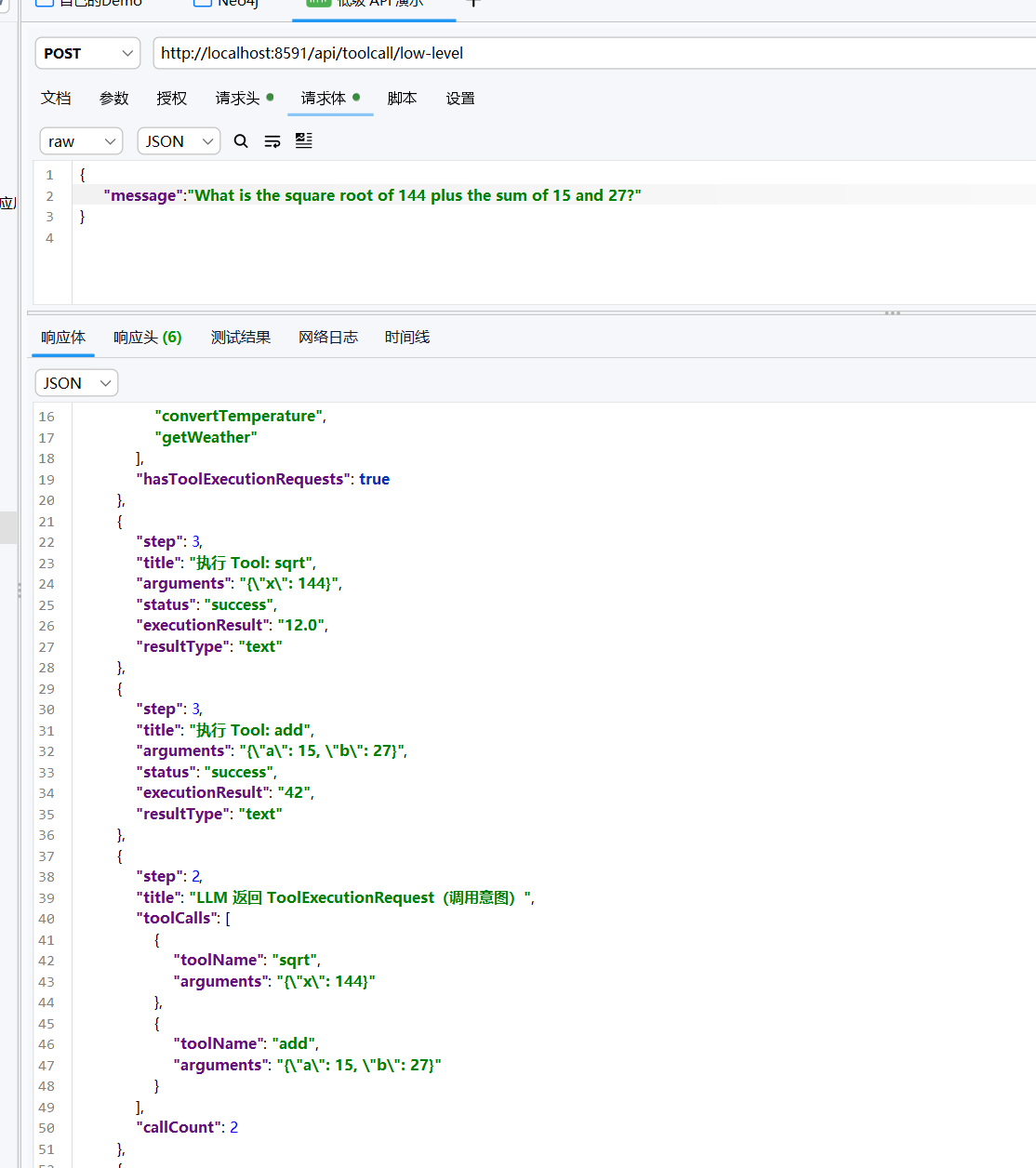
测试一下,可以清楚的看到每一步发生什么,数据进行了怎么样的流转
image-20260708180101443
高级 API
LangChain4j 中 Tool Calling 的高级 API 特指
基于 AiServices 构建 AI 服务接口
的声明式的内容
首先,在 ToolCallConfig 中,所有Tool Calling
需要使用的内容的 Bean 都通过 AiServices.builder(接口.class)
构建。这是起点,例如我们随便看一个 Tool Calling 的注册的 Bean
1
2
3
4
5
6
7
8
9
10
11
12
13
14
15
@Bean public BasicAssistant basicAssistant ( @Qualifier("toolCallChatModel") ChatModel chatModel, Calculator calculator, WeatherTool weatherTool) { return AiServices.builder(BasicAssistant.class) .chatModel(chatModel) .tools(calculator, weatherTool) .chatMemoryProvider(sessionId -> MessageWindowChatMemory.builder() .id(sessionId) .maxMessages(maxMessages) .chatMemoryStore(toolCallMemoryStore()) .build()) .build(); }
高级 API 最大的便利性在于工具就是普通的 Spring Bean 然后加上普通的
Java 方法,你只需加注解就可以了
1
2
3
4
5
6
7
8
@Component public class Calculator { @Tool("Adds two integers and returns the sum") public int add (@P("The first number") int a, // 描述参数给 LLM 看 @P("The second number") int b) { return a + b; } }
框架通过反射扫描 @Tool 方法,自动生成符合
OpenAI/DeepSeek 标准的 JSON Schema,基本上,最后还是会回到低级 API
中手动写的
ToolSpecifications.toolSpecificationsFrom(...)
然后就定义 AI 服务接口就可以了
1
2
3
4
public interface BasicAssistant { String chat (@MemoryId String sessionId, // ① 会话隔离标识 @UserMessage String message) ; }
高级 API 就是这么简单,实际上,跟学 AI Service
的适合,只需要多两项配置,多写俩注解就可以了
而且之前我们也提到过,当你把返回值声明为
Result<String> 而非 String
时,框架会额外返回本次调用的完整元数据 ,调用后,你可以通过以下方法检查本次交互究竟发生了什么:
1
2
3
4
public interface InspectableAssistant { Result<String> chat (@MemoryId String sessionId, @UserMessage String message) ;}
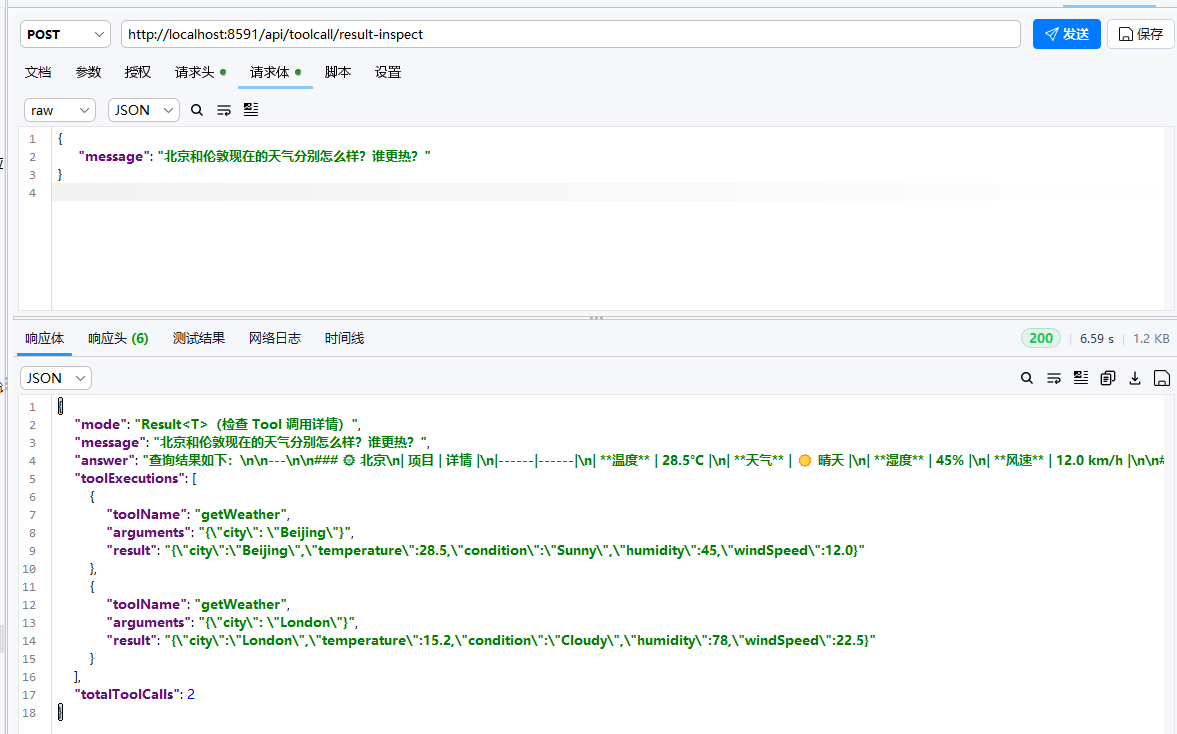
那么效果差不多就是这样
image-20260717175544275
如果希望使用流式 api,那么可以这样使用,在构建 bean 的时候使用
StreamingChatModel,然后在 Controller 写接口的时候注意使用流式的 api
即可
大致在服务层中,被调用的方法是这样的
1
2
3
4
5
6
7
8
9
10
11
12
13
14
15
16
17
18
19
20
21
22
23
24
25
26
27
28
29
30
31
32
33
34
35
36
37
38
39
40
41
42
43
44
45
46
47
48
49
50
51
52
53
54
55
56
57
58
59
60
61
62
63
64
65
66
67
68
69
70
public SseEmitter streamingWithToolsDemo (String userMessage) { SseEmitter emitter = new SseEmitter (120_000L ); List<ToolSpecification> toolSpecs = new ArrayList <>(); toolSpecs.addAll(ToolSpecifications.toolSpecificationsFrom(Calculator.class)); toolSpecs.addAll(ToolSpecifications.toolSpecificationsFrom(WeatherTool.class)); List<ChatMessage> messages = new ArrayList <>(); messages.add(SystemMessage.from( "You are a helpful assistant. Use tools for calculations and weather queries." )); messages.add(UserMessage.from(userMessage)); try { streamingChatModel.chat(ChatRequest.builder() .messages(messages) .toolSpecifications(toolSpecs) .build(), new StreamingChatResponseHandler () { private final List<ToolExecutionRequest> completedToolRequests = new ArrayList <>(); private AiMessage lastAiMessage; @Override public void onPartialResponse (String partialResponse) { try { .... } catch (Exception e) { } } @Override public void onPartialToolCall (PartialToolCall partialToolCall) { try { ... } catch (Exception e) { } } @Override public void onCompleteToolCall (CompleteToolCall completeToolCall) { ToolExecutionRequest req = completeToolCall.toolExecutionRequest(); completedToolRequests.add(req); String execResult = executeTool(req); try { ... } catch (Exception e) { } messages.add(ToolExecutionResultMessage.from(req, execResult)); } @Override public void onCompleteResponse (ChatResponse completeResponse) { ... } @Override public void onError (Throwable error) { emitter.completeWithError(error); } }); } catch (Exception e) { emitter.completeWithError(e); }
实际上,流式模式下 Tool Calling 的处理与非流式不同:
LLM 先流式输出文本
遇到 Tool Call 时发出 onPartialToolCall,开始调用工具
工具调用完成后触发 onCompleteToolCall,拿到完整的
ToolExecutionRequest
执行 Tool 后,需要将结果发回 LLM 继续流式输出
最终所有内容输出完毕时触发 onCompleteResponse
动态调用工具
动态调用工具就是我们构建一个动态的 ToolProvider
据用户消息内容按需调用不同的工具。
为什么需要这样呢?实际上,工具非常多时,这种方式能够减少每次请求的
Schema 大小,而且通常情况下,Agent
中不同权限调用的工具通常也不一样,管理员肯定不能和不受信者用一样的工具你说是吧。
而且这样也能够按上下文提供不同工具集
那么,我们在配置类中构建这样的一个动态的 ToolProvider
1
2
3
4
5
6
7
8
9
10
11
12
13
14
15
16
17
18
19
20
21
22
23
24
25
26
27
28
29
30
31
32
33
34
35
36
37
38
39
40
41
42
43
44
45
46
47
48
49
50
51
@Bean public ToolProvider dynamicToolProvider (Calculator calculator, WeatherTool weatherTool) { Map<String, ToolSpecification> allSpecs = new LinkedHashMap <>(); Map<String, DefaultToolExecutor> allExecutors = new LinkedHashMap <>(); for (ToolSpecification spec : ToolSpecifications.toolSpecificationsFrom(Calculator.class)) { allSpecs.put(spec.name(), spec); allExecutors.put(spec.name(), createExecutor(calculator, Calculator.class, spec.name())); } for (ToolSpecification spec : ToolSpecifications.toolSpecificationsFrom(WeatherTool.class)) { allSpecs.put(spec.name(), spec); allExecutors.put(spec.name(), createExecutor(weatherTool, WeatherTool.class, spec.name())); } return (toolProviderRequest) -> { String userMessage = toolProviderRequest.userMessage().singleText().toLowerCase(); ToolProviderResult.Builder resultBuilder = ToolProviderResult.builder(); if (containsAny(userMessage, "add" , "sum" , "subtract" , "minus" , "multiply" , "times" , "divide" , "sqrt" , "square root" , "calculate" , "math" , "compute" , "+" , "-" , "*" , "/" , "number" , "integer" )) { for (String name : List.of("add" , "subtract" , "multiply" , "divide" , "sqrt" )) { if (allSpecs.containsKey(name)) { resultBuilder.add(allSpecs.get(name), allExecutors.get(name)); } } } if (containsAny(userMessage, "weather" , "temperature" , "rain" , "sunny" , "cloudy" , "wind" , "humidity" , "forecast" , "celsius" , "fahrenheit" , "city" , "climate" )) { for (String name : List.of("getWeather" , "convertTemperature" )) { if (allSpecs.containsKey(name)) { resultBuilder.add(allSpecs.get(name), allExecutors.get(name)); } } } return resultBuilder.build(); }; }
实际上这是一种比较低端的方式,因为工具的调用不能依靠大模型自己的判断来处理,只能够根据消息的情况来选择不同的工具,所以说,真正想要实现动态选择工具的,必须需要使用
Agentic 模式
那么,这个模式如何实现呢?实际上,不做任何关键词过滤,把 Calculator
和 WeatherTool 的全部方法都暴露给 LLM 即可,这样,LLM
收到用户消息后,会用自己的推理能力判断:
1
2
3
4
5
6
7
8
9
10
11
12
13
14
15
@Bean public AgenticDynamicAssistant agenticDynamicAssistant ( @Qualifier("toolCallChatModel") ChatModel chatModel, Calculator calculator, WeatherTool weatherTool) { return AiServices.builder(AgenticDynamicAssistant.class) .chatModel(chatModel) .tools(calculator, weatherTool) .chatMemoryProvider(sessionId -> MessageWindowChatMemory.builder() .id(sessionId) .maxMessages(maxMessages) .chatMemoryStore(toolCallMemoryStore()) .build()) .build(); }
然后,在编写服务层的时候,最好在服务层的调用方法中填写上一些相关的提示词,这样以至于每轮把全部工具 发给
LLM 的时候提升 LLM 调用工具的效率
1
2
3
4
5
6
7
8
9
10
11
12
13
14
15
16
SystemMessage systemMessage = SystemMessage.from(""" You are an autonomous AI assistant with access to calculation and weather tools. IMPORTANT — Agentic decision-making principles: 1. You decide WHICH tools to call based on the user's request — no one pre-selects tools for you. 2. You decide HOW MANY tools to call — one, many, or none at all. 3. You decide the ORDER — call tools in whatever sequence makes sense. 4. You decide when to STOP — when you have enough information to answer, stop calling tools. Think step by step: - What does the user actually need? - Which tools can help fulfill that need? - After getting tool results, is more information needed? - When ready, synthesize a clear natural-language answer. Be autonomous. Be thorough. Use tools when they help, skip them when they don't.""" );
但是这种方式就不适合一些边界性强,推理空间少的情况
那么,上面提到的这些内容有条件地将一个 AI Service
作为工具暴露,因此一个 AI Service 完全也可作为另一个 AI Service
的工具,下面讲。
将 AI Service 作为其他
AI Service 的工具
AI Service 还可以作为工具供其他 AI Service 使用。
这在许多 Agentic AI 的应用场景中非常有用:一个 AI Service
可以请求另一个更专业的 AI Service 来完成特定任务。这时候,被请求的 AI
Service 实际上就会成为请求者服务的一个工具被调用
使用 @Tool 包装 AI Service 是比较常见的方式,将另一个 AI
Service 封装为 @Tool
方法,供主 AI Service 调用。这样就实现了类似「专家系统」的模式,一个通用
AI 将特定任务委托给专用 AI。
1
2
3
4
5
6
7
8
9
10
11
12
13
14
15
16
17
18
19
20
21
@Component public class AiServiceToolWrapper { ...... @Tool(""" Delegates complex calculation or weather queries to a specialized assistant. Use this when you need to perform calculations or get weather information. The specialist has access to calculator and weather tools. """) public String askSpecialist ( @P("The question to ask the specialist assistant") String question, @ToolMemoryId String memoryId) { return specialistAssistant.chat(memoryId, question); } }
然后,在 ToolCallConfig 中添加这个新 Bean
1 2 3 4 5 6 7 8 9 10 11 12 13 14 15 16 17 18 19 20 21 22 23 24 25 @Bean public AiServiceToolWrapper aiServiceToolWrapper (BasicAssistant basicAssistant) { return new AiServiceToolWrapper (basicAssistant); } @Bean public AdvancedAssistant advancedAssistant ( @Qualifier("toolCallChatModel") ChatModel chatModel, AiServiceToolWrapper aiServiceToolWrapper) { return AiServices.builder(AdvancedAssistant.class) .chatModel(chatModel) .tools(aiServiceToolWrapper) .chatMemoryProvider(sessionId -> MessageWindowChatMemory.builder() .id(sessionId) .maxMessages(maxMessages) .chatMemoryStore(toolCallMemoryStore()) .build()) .build(); } public interface AdvancedAssistant { String chat (@MemoryId String sessionId, @UserMessage String message) ; }
可以看到,将 AI Service 包装为 Tool
关键是创建一个包装类 ,因为LangChain4j 对
@Tool
方法的扫描是基于实例方法 的,要么包装成包装类,要么ToolSpecifications
+ DefaultToolExecutor
这是一种比较常规的方式,但是,如果完全体现它的精髓,还是需要 Agentic
模式,这种方式完全符合所谓的专家委派,至于如何使用 Agentic
模式,其实跟上面的动态调用工具的内容相当类似
访问已执行的工具
如果你希望访问 AI Service 调用过程中执行的工具,可以将返回类型包装在
Result 中
首先我们定义相关的契约接口,使用 Result 包装
1
2
3
4
5
public interface InspectableAssistant { dev.langchain4j.service.Result<String> chat ( @dev .langchain4j.service.MemoryId String sessionId, @dev .langchain4j.service.UserMessage String message) ; }
声明了这样的一个接口之后,那么我们就这样声明其接口然后被作为方法的类型,通过
AiServices 生成代理实现
1
2
3
4
5
6
7
8
9
10
11
12
13
14
15
@Bean public InspectableAssistant inspectableAssistant ( @Qualifier("toolCallChatModel") ChatModel chatModel, Calculator calculator, WeatherTool weatherTool) { return AiServices.builder(InspectableAssistant.class) .chatModel(chatModel) .tools(calculator, weatherTool) .chatMemoryProvider(sessionId -> MessageWindowChatMemory.builder() .id(sessionId) .maxMessages(maxMessages) .chatMemoryStore(toolCallMemoryStore()) .build()) .build(); }
然后请求体中使用我们的实现,就可以访问这个 Result
对象,拿到你想要的内容
1
2
3
4
5
6
7
8
9
10
11
12
13
14
15
16
17
18
19
20
21
22
23
24
25
26
27
private final InspectableAssistant inspectableAssistant; @PostMapping("/result-inspect") public ResponseEntity<Map<String, Object>> resultInspect (@RequestBody ToolCallRequest req) { String sessionId = req.getSessionId() != null ? req.getSessionId() : UUID.randomUUID().toString(); Result<String> result = inspectableAssistant.chat(sessionId, req.getMessage()); Map<String, Object> response = new LinkedHashMap <>(); response.put("mode" , "Result<T>(检查 Tool 调用详情)" ); response.put("message" , req.getMessage()); response.put("answer" , result.content()); var toolExecutions = result.toolExecutions().stream() .map(te -> { Map<String, Object> m = new LinkedHashMap <>(); m.put("toolName" , te.request().name()); m.put("arguments" , te.request().arguments()); m.put("result" , te.result()); return m; }) .toList(); response.put("toolExecutions" , toolExecutions); response.put("totalToolCalls" , result.toolExecutions().size()); return ResponseEntity.ok(response); }
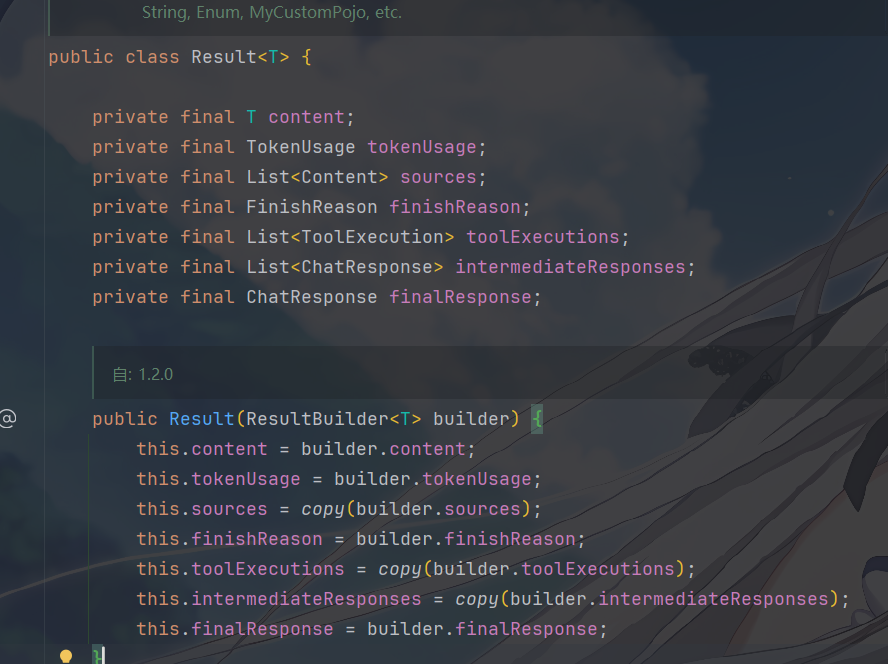
Result 中包含的内容如下:
image-20260729164044138
字段
类型
说明
contentTAI 服务的最终返回内容 (LLM
的自然语言回答),类型由您定义(String、MyPojo
等)
tokenUsageTokenUsageToken 使用统计 (输入 Token 数 + 输出 Token
数),聚合了所有对话轮次的总和
sourcesList<Content>RAG 检索来源 (如果使用了 rag()
配置),返回检索到的文档片段
finishReasonFinishReason最终响应的结束原因 (如
STOP、TOOL_EXECUTION、LENGTH
等)
toolExecutionsList<ToolExecution>本次调用中执行的所有工具记录 (包含请求参数 +
执行结果)
intermediateResponsesList<ChatResponse>中间对话响应 (所有包含
ToolExecutionRequest 的 LLM 中间轮次响应)
finalResponseChatResponse最终对话响应 (不包含工具调用请求的最终 LLM
响应)
在流式模式中,需要把返回值声明为 TokenStream,通过
.onToolExecuted() 回调获取
1
2
3
4
5
6
7
8
9
10
11
12
13
14
15
16
17
18
19
20
21
22
23
24
25
26
27
28
29
30
31
32
33
34
35
36
37
38
39
40
41
42
43
44
45
46
47
48
49
50
51
public SseEmitter streamingAIServiceWithToolsDemo (String userMessage) { SseEmitter emitter = new SseEmitter (120_000L ); String sessionId = UUID.randomUUID().toString(); TokenStream tokenStream = streamingToolAssistant.chat(sessionId, userMessage); tokenStream .onPartialResponse(token -> { try { Map<String, Object> event = new LinkedHashMap <>(); event.put("type" , "token" ); event.put("data" , token); emitter.send(SseEmitter.event().name("token" ).data(event)); } catch (Exception e) { emitter.completeWithError(e); } }) .onToolExecuted(toolExecution -> { try { Map<String, Object> event = new LinkedHashMap <>(); event.put("type" , "toolExecuted" ); event.put("toolName" , toolExecution.request().name()); event.put("arguments" , toolExecution.request().arguments()); event.put("result" , toolExecution.result()); emitter.send(SseEmitter.event().name("tool" ).data(event)); } catch (Exception e) { emitter.completeWithError(e); } }) .onCompleteResponse(response -> { try { Map<String, Object> doneEvent = new LinkedHashMap <>(); doneEvent.put("type" , "done" ); doneEvent.put("finalAnswer" , response.aiMessage().text()); emitter.send(SseEmitter.event().name("done" ).data(doneEvent)); emitter.complete(); } catch (Exception e) { emitter.completeWithError(e); } }) .onError(error -> { ... }) .start(); return emitter; }
其实吧,ToolExecution 和 Result<T>
中用的是同一个类,包装一下的事
思考-行动-观察循环
这是 LangChain4j Tool Calling 的第一性原理
理解了它,就理解了 Agentic AI,实际上,无论是简单的 AI Service
还是复杂的多 Agent 编排,底层都是这个循环在驱动。
思考:分析用户需求,推理需要什么工具?什么参数?要不要调用?
行动:根据 Thought 的决策,调用对应的 @Tool 方法
观察:收到 Action 的结果,将这个结果作为上下文,进入下一轮思考
AI Services 内部如何实现这个循环?当你调用
AiServices.builder().tools(...).build() 返回的
Assistant,其实会有这样的一个 while 循环
1
2
3
4
5
6
7
8
9
10
while (true ) { response = chatModel.chat(messages, toolSpecifications) if (!response.hasToolExecutionRequests()) { return response.text() } for (request : response.toolExecutionRequests()) { result = tool.execute(request) messages.add(result) } }
这个 while 循环就是 ReAct 循环的引擎,框架帮你做了,你只需要写 @Tool 方法就行了
那么,体现在代码中,就是这样
1
2
3
4
5
6
7
8
9
10
11
12
13
14
15
16
17
18
19
20
21
22
23
24
25
26
27
28
29
30
31
32
33
34
35
36
37
38
39
40
41
42
43
44
45
46
47
48
49
50
51
52
53
54
55
56
57
58
59
60
61
62
63
64
65
66
67
68
69
70
71
72
73
74
75
76
77
78
79
80
81
82
83
84
85
86
87
88
89
90
91
92
93
94
95
96
97
98
99
100
101
102
103
104
105
106
107
108
109
110
111
112
113
114
115
116
117
118
119
120
121
122
123
124
125
126
127
128
129
130
131
132
133
public Map<String, Object> reactCycleDemo (String userMessage) { Map<String, Object> result = new LinkedHashMap <>(); List<Map<String, Object>> rounds = new ArrayList <>(); List<ToolSpecification> toolSpecs = new ArrayList <>(); toolSpecs.addAll(ToolSpecifications.toolSpecificationsFrom(Calculator.class)); toolSpecs.addAll(ToolSpecifications.toolSpecificationsFrom(WeatherTool.class)); List<ChatMessage> messages = new ArrayList <>(); messages.add(SystemMessage.from(""" You are a reasoning AI assistant. Before calling any tool, think about: 1. What does the user actually need? 2. Which specific tools can help? 3. Can this be done in one round, or do I need multiple rounds? After receiving tool results, think about whether you need more information. Only give the final answer when you're confident you have everything.""" )); messages.add(UserMessage.from(userMessage)); int maxRounds = 10 ; int roundNum = 0 ; while (roundNum < maxRounds) { roundNum++; Map<String, Object> round = new LinkedHashMap <>(); round.put("round" , roundNum); ChatResponse response = chatModel.chat(ChatRequest.builder() .messages(messages) .toolSpecifications(toolSpecs) .build()); AiMessage aiMessage = response.aiMessage(); messages.add(aiMessage); Map<String, Object> thought = new LinkedHashMap <>(); if (aiMessage.hasToolExecutionRequests()) { List<Map<String, Object>> decisions = new ArrayList <>(); for (ToolExecutionRequest req : aiMessage.toolExecutionRequests()) { Map<String, Object> d = new LinkedHashMap <>(); d.put("tool" , req.name()); d.put("arguments" , req.arguments()); decisions.add(d); } thought.put("decision" , "CALL_TOOLS" ); thought.put("reasoning" , "LLM 分析用户需求后,决定调用 " + decisions.size() + " 个工具来获取信息" ); thought.put("plannedActions" , decisions); } else { thought.put("decision" , "STOP_AND_ANSWER" ); thought.put("reasoning" , "LLM 认为已经拥有足够信息(或不需要工具)," + "决定输出最终答案" ); } round.put("thought" , thought); if (!aiMessage.hasToolExecutionRequests()) { round.put("finalAnswer" , aiMessage.text()); rounds.add(round); break ; } List<Map<String, Object>> actions = new ArrayList <>(); for (ToolExecutionRequest req : aiMessage.toolExecutionRequests()) { Map<String, Object> action = new LinkedHashMap <>(); action.put("tool" , req.name()); action.put("arguments" , req.arguments()); String execResult; try { execResult = executeTool(req); action.put("status" , "SUCCESS" ); } catch (Exception e) { execResult = "Error: " + e.getMessage(); action.put("status" , "FAILED" ); action.put("error" , e.getMessage()); } action.put("result" , execResult); actions.add(action); messages.add(ToolExecutionResultMessage.from(req, execResult)); } round.put("actions" , actions); Map<String, Object> observation = new LinkedHashMap <>(); observation.put("summary" , "工具执行完毕,结果已加入上下文。" + "下一轮 LLM 将看到这些 Observation 数据," + "据此判断:信息是否足够?还需要更多工具吗?" ); List<String> observationData = new ArrayList <>(); for (Map<String, Object> a : actions) { observationData.add(a.get("tool" ) + " → " + a.get("result" )); } observation.put("data" , observationData); round.put("observation" , observation); rounds.add(round); } if (roundNum >= maxRounds) { result.put("warning" , "达到最大循环轮数 (" + maxRounds + "),可能存在循环调用问题" ); } result.put("mode" , "思考—行动—观察(ReAct)循环" ); result.put("description" , "每个回合由 Thought → Action → Observation 三个阶段组成," + "LLM 自主决定何时停止循环" ); result.put("userMessage" , userMessage); result.put("totalRounds" , roundNum); result.put("availableTools" , toolSpecs.stream().map(ToolSpecification::name).toList()); result.put("rounds" , rounds); if (!rounds.isEmpty()) { Map<String, Object> lastRound = rounds.get(rounds.size() - 1 ); if (lastRound.containsKey("finalAnswer" )) { result.put("finalAnswer" , lastRound.get("finalAnswer" )); } } return result; }
最后,可以看出,LangChain4j 的每个工具调用回合由 3
个阶段 组成
1
2
3
4
5
6
7
8
9
10
11
12
┌──────────────────────────────────────────────────────────┐ │ ReAct 循环 │ │ │ │ ┌──────────┐ ┌──────────┐ ┌──────────────┐ │ │ │ THOUGHT │ ──→ │ ACTION │ ──→ │ OBSERVATION │ │ │ │ LLM做 │ │ 框架做 │ │ LLM做 │ │ │ └──────────┘ └──────────┘ └──────────────┘ │ │ ↑ │ │ │ └─────────── 循环 ─────────────────┘ │ │ 直到 LLM 输出纯文本(不再有 ToolExecutionRequest) │ └──────────────────────────────────────────────────────────┘