RestAPI
在前面我们讲解了手动发送的对 ES 索引库和文档的操作
本质上这些都是组装请求,携带JSON,进行我们想要的操作,通过http请求发送给ES。
REST(Representational State
Transfer,表述性状态转移)是一种软件架构风格,用于构建网络应用程序。而基于
REST 风格设计的 API 就称为 RestAPI。
RestAPI 具备以下特点:
资源抽象 :将网络中的一切都视为资源,比如一篇文章、一个用户、一条订单记录等,每个资源都有对应的唯一
URI(Uniform Resource
Identifier,统一资源标识符)来标识,像https://example.com/api/users/1
就可以表示 ID 为 1 的用户资源。无状态通信 :客户端和服务器之间的通信是无状态的,即每次请求都包含了处理该请求所需的全部信息,服务器不会依赖之前请求的状态来处理当前请求。这使得请求可以被独立处理,提高了系统的可扩展性和可靠性。统一接口 :使用标准的 HTTP
方法(GET、POST、PUT、DELETE 等)来操作资源。例如,GET
用于获取资源,POST 用于创建资源,PUT 用于更新资源,DELETE 用于删除资源
。分层系统 :可以通过中间层(如代理服务器、网关等)来处理请求,这有助于提高系统的安全性、可维护性和性能,同时也能隐藏内部系统的复杂性。
ES官方提供了各种不同语言的客户端,用来操作ES。
官方文档地址:https://www.elastic.co/guide/en/elasticsearch/client/index.html、
在 Spring Boot
中,我们通过RestHighLevelClient(Elasticsearch 官方提供的
Java 高级客户端) 来使用 RestAPI 操作 ES
在pom.xml文件中添加 Elasticsearch 客户端依赖以及 Spring
Data Elasticsearch 依赖,就可以了
1 2 3 4 5 6 7 8 9 10 11 12 13 <dependencies > <dependency > <groupId > org.elasticsearch.client</groupId > <artifactId > elasticsearch-rest-high-level-client</artifactId > <version > 7.17.0</version > </dependency > <dependency > <groupId > org.springframework.boot</groupId > <artifactId > spring-boot-starter-data-elasticsearch</artifactId > </dependency > </dependencies >
但是我是9.1.4,所以这个依赖的内容要进行修改,因为当 Elasticsearch
版本为 9.1.4 时,RestHighLevelClient
已被官方标记为废弃 (deprecated),并推荐使用
ElasticsearchClient
1 2 3 4 5 6 7 8 9 10 11 12 13 14 15 16 17 18 19 20 21 22 23 24 25 26 27 <dependencies > <dependency > <groupId > co.elastic.clients</groupId > <artifactId > elasticsearch-java</artifactId > <version > 9.1.4</version > </dependency > <dependency > <groupId > com.fasterxml.jackson.core</groupId > <artifactId > jackson-databind</artifactId > </dependency > <dependency > <groupId > org.springframework.boot</groupId > <artifactId > spring-boot-starter-data-elasticsearch</artifactId > <exclusions > <exclusion > <groupId > org.elasticsearch.client</groupId > <artifactId > elasticsearch-rest-high-level-client</artifactId > </exclusion > </exclusions > </dependency > </dependencies >
然后在application.yml文件中配置 Elasticsearch
的连接信息:
1
2
3
4
5
6
7
spring: data: elasticsearch: cluster-name: elasticsearch cluster-nodes: 127.0 .0 .1 :9300 rest: uris: http://127.0.0.1:9200
Spring
Boot框架中如何使用 API 操作索引库
新版本9.x 和 7.x,8.x 的ES的API操作不太一样,我这里以我的版本 9.1.4
的内容来了
Elasticsearch 9.x 版本(以 9.1.4 为例)在 Java API 层面延续了 8.x 的
co.elastic.clients.elasticsearch 客户端体系,但在部分 API
细节(如索引映射构建、分页参数)上有微调。
前提
在编写操作方法前,需完成依赖引入和客户端初始化,这是后续所有操作的基础。
通过 @Configuration 类创建
ElasticsearchClient 实例,并注入 Spring 容器,供 Service
层调用。9.x 版本客户端默认使用 HTTP/2 协议,配置与 8.x 一致:
1
2
3
4
5
6
7
8
9
10
11
12
13
14
15
16
17
18
19
20
21
22
23
24
25
26
27
import co.elastic.clients.elasticsearch.ElasticsearchClient;import co.elastic.clients.json.jackson.JacksonJsonpMapper;import co.elastic.clients.transport.rest_client.RestClientTransport;import org.apache.http.HttpHost;import org.elasticsearch.client.RestClient;import org.springframework.context.annotation.Bean;import org.springframework.context.annotation.Configuration;@Configuration public class EsConfig { @Bean public ElasticsearchClient elasticsearchClient () { RestClient restClient = RestClient.builder( new HttpHost ("localhost" , 9200 , "http" ) ).build(); RestClientTransport transport = new RestClientTransport ( restClient, new JacksonJsonpMapper () ); return new ElasticsearchClient (transport); } }
关于索引库的以下所有操作,均封装在 EsService 类中,通过
@Autowired 注入 ElasticsearchClient
创建索引 + 定义映射
9.x 版本创建索引时,映射(Mapping)的构建方式与 8.x 一致,需通过
mappings() 方法定义字段类型(如
keyword、text、long 等)。
1 2 3 4 5 6 7 8 9 10 11 12 13 14 15 16 17 18 19 20 21 22 23 24 25 26 public boolean createUserIndex () { try { CreateIndexResponse response = elasticsearchClient.indices() .create(c -> c .index("user_index" ) .mappings(m -> m .properties("id" , p -> p.keyword(k -> k)) .properties("name" , p -> p.text(t -> t.analyzer("standard" ))) .properties("age" , p -> p.integer(i -> i)) .properties("email" , p -> p.keyword(k -> k)) .properties("createTime" , p -> p.date(d -> d.format("yyyy-MM-dd HH:mm:ss" ))) ) .settings(s -> s .numberOfShards("3" ) .numberOfReplicas("1" ) ) ); return response.acknowledged(); } catch (IOException e) { throw new RuntimeException ("创建索引失败" , e); } }
一般情况下创建索引和判断索引是否存在会一起使用
1 2 3 4 5 6 7 8 ExistsResponse existsResponse = esClient.indices().exists( ExistsRequest.of(e -> e.index(INDEX_NAME)) ); if (existsResponse.value()) { System.out.println("索引 " + INDEX_NAME + " 已存在,无需重复创建" ); return false ; }
修改索引/更新索引
Elasticsearch
索引创建后,大部分配置(如字段类型)不可修改 ,仅支持添加新字段、修改索引别名等操作。9.x
版本修改映射的 API 与 8.x 一致。
为 galgame_images 索引新增 description
字段(text 类型,用于图片描述)。
1
2
3
4
5
6
7
8
9
10
11
12
13
14
15
16
17
18
import co.elastic.clients.elasticsearch.indices.UpdateMappingRequest;import co.elastic.clients.elasticsearch.indices.UpdateMappingResponse;public boolean addIndexField () throws Exception { UpdateMappingRequest updateRequest = UpdateMappingRequest.of(u -> u .index(INDEX_NAME) .mappings(m -> m .properties("description" , p -> p.text(t -> t.analyzer("standard" ))) ) ); UpdateMappingResponse response = esClient.indices().updateMapping(updateRequest); return response.acknowledged(); }
但是可变字段肯定还是可以修改的
删除索引/文档
9.x 版本 API 与 8.x 一致,通过 delete() 方法执行。
1
2
3
4
5
6
7
8
9
10
11
12
13
14
15
16
17
18
import co.elastic.clients.elasticsearch.indices.DeleteIndexRequest;import co.elastic.clients.elasticsearch.indices.DeleteIndexResponse;public boolean deleteIndex () throws Exception { if (!isIndexExists()) { System.out.println("索引 " + INDEX_NAME + " 不存在,无需删除" ); return false ; } DeleteIndexRequest deleteRequest = DeleteIndexRequest.of(d -> d.index(INDEX_NAME)); DeleteIndexResponse response = esClient.indices().delete(deleteRequest); return response.acknowledged(); }
根据文档 ID 删除,与删除索引逻辑类似,可以先判断文档是否存在。
1
2
3
4
5
6
7
8
9
10
11
12
13
14
15
16
17
18
19
import co.elastic.clients.elasticsearch.core.DeleteRequest;import co.elastic.clients.elasticsearch.core.DeleteResponse;public IndexResult deleteDocById (String docId) throws Exception { DeleteRequest deleteRequest = DeleteRequest.of(d -> d .index(INDEX_NAME) .id(docId) ); DeleteResponse response = esClient.delete(deleteRequest); return response.result(); }
查询索引
流程也差不多,判断存在 + 获取索引信息
获取索引信息 :查询索引的映射、设置等详情(9.x 版本
API 无变化)。
1 2 3 4 5 6 7 8 9 10 11 12 13 14 public void getIndexMapping () throws Exception { var mappingResponse = esClient.indices().getMapping(g -> g.index(INDEX_NAME)); String gameNameFieldType = mappingResponse.get(INDEX_NAME) .mappings() .properties() .get("gameName" ) .type(); System.out.println("gameName 字段类型:" + gameNameFieldType); }
新增/修改 文档
ES 中「新增」和「修改」文档共用 index() 方法:
若文档 ID 不存在:执行「新增」操作;
若文档 ID 已存在:执行「全量覆盖修改」操作(9.x 版本无变化)。
前提要定义实体类,字段需与索引映射对应
1
2
3
4
5
6
7
8
9
10
11
12
13
14
15
16
17
18
19
20
21
22
import co.elastic.clients.elasticsearch.core.IndexRequest;import co.elastic.clients.elasticsearch.core.IndexResponse;import co.elastic.clients.elasticsearch.core.indexing.IndexResult;public IndexResult addOrUpdateDoc (String docId, ImageInfo imageInfo) throws Exception { IndexRequest<ImageInfo> indexRequest = IndexRequest.of(i -> i .index(INDEX_NAME) .id(docId) .document(imageInfo) ); IndexResponse response = esClient.index(indexRequest); return response.result(); }
查询文档
文档查询是 ES 的核心能力,9.x 版本支持
match_all(全量查询)、term(精确查询)、match(模糊查询)、bool(组合查询)等,分页参数通过
from(偏移量)和 size(每页条数)控制。
根据id查询
1
2
3
4
5
6
7
8
9
10
11
12
13
14
15
16
17
18
19
20
21
22
23
24
25
import co.elastic.clients.elasticsearch.core.GetRequest;import co.elastic.clients.elasticsearch.core.GetResponse;public ImageInfo getDocById (String docId) throws Exception { GetRequest getRequest = GetRequest.of(g -> g .index(INDEX_NAME) .id(docId) ); GetResponse<ImageInfo> response = esClient.get(getRequest, ImageInfo.class); if (response.found()) { return response.source(); } else { System.out.println("文档 " + docId + " 不存在" ); return null ; } }
全量查询(匹配所有文档,带分页)
1
2
3
4
5
6
7
8
9
10
11
12
13
14
15
16
17
18
19
20
21
22
23
24
25
26
27
28
29
30
31
32
33
34
35
import co.elastic.clients.elasticsearch.core.SearchRequest;import co.elastic.clients.elasticsearch.core.SearchResponse;import co.elastic.clients.elasticsearch.core.search.Hit;import java.util.ArrayList;import java.util.List;public List<ImageInfo> searchAllDocs (int from, int size) throws Exception { SearchRequest searchRequest = SearchRequest.of(s -> s .index(INDEX_NAME) .query(q -> q.matchAll(m -> m)) .from(from) .size(size) ); SearchResponse<ImageInfo> response = esClient.search(searchRequest, ImageInfo.class); List<ImageInfo> docList = new ArrayList <>(); for (Hit<ImageInfo> hit : response.hits().hits()) { if (hit.source() != null ) { docList.add(hit.source()); } } System.out.println("全量查询命中总数:" + response.hits().total().value()); return docList; }
条件查询(组合查询:游戏名模糊
+ 标签精确)
结合 match(模糊查询游戏名)和
term(精确查询标签),用 bool 组合条件
这种和上面也差不多,就是
Match\Term\search + Query,然后构建字段
1
2
3
4
5
6
7
8
9
10
11
12
13
14
15
16
17
18
19
20
21
22
23
24
25
26
27
28
29
30
31
32
33
34
35
36
37
38
39
40
41
42
43
44
45
46
47
48
49
50
51
52
53
54
55
56
import co.elastic.clients.elasticsearch._types.query_dsl.BoolQuery;import co.elastic.clients.elasticsearch._types.query_dsl.MatchQuery;import co.elastic.clients.elasticsearch._types.query_dsl.Query;import co.elastic.clients.elasticsearch._types.query_dsl.TermQuery;public List<ImageInfo> searchDocsByCondition (String gameName, String tag, int from, int size) throws Exception { BoolQuery.Builder boolQuery = new BoolQuery .Builder(); if (gameName != null && !gameName.trim().isEmpty()) { MatchQuery matchQuery = MatchQuery.of(m -> m .field("gameName" ) .query(gameName.trim()) .fuzziness("AUTO" ) ); boolQuery.must(Query.of(q -> q.match(matchQuery))); } if (tag != null && !tag.trim().isEmpty()) { TermQuery termQuery = TermQuery.of(t -> t .field("tags" ) .value(tag.trim()) ); boolQuery.must(Query.of(q -> q.term(termQuery))); } SearchRequest searchRequest = SearchRequest.of(s -> s .index(INDEX_NAME) .query(Query.of(q -> q.bool(boolQuery.build()))) .from(from) .size(size) ); SearchResponse<ImageInfo> response = esClient.search(searchRequest, ImageInfo.class); List<ImageInfo> docList = new ArrayList <>(); for (Hit<ImageInfo> hit : response.hits().hits()) { if (hit.source() != null ) { docList.add(hit.source()); } } System.out.println("条件查询命中总数:" + response.hits().total().value()); return docList; }
实际项目中集成ES
我就以我上次minio那个项目继续扩展操作了
添加依赖和配置文件
1 2 3 4 5 6 7 8 9 10 11 12 13 14 15 16 17 18 19 20 21 22 23 24 <dependency > <groupId > co.elastic.clients</groupId > <artifactId > elasticsearch-java</artifactId > <version > 9.1.4</version > </dependency > <dependency > <groupId > com.fasterxml.jackson.core</groupId > <artifactId > jackson-databind</artifactId > </dependency > <dependency > <groupId > org.springframework.boot</groupId > <artifactId > spring-boot-starter-data-elasticsearch</artifactId > </dependency > <dependency > <groupId > org.elasticsearch.client</groupId > <artifactId > elasticsearch-rest-client</artifactId > </dependency >
1 2 3 4 5 6 7 8 9 10 11 spring.elasticsearch.uris =http://localhost:9200 spring.elasticsearch.username =spring.elasticsearch.password =spring.elasticsearch.connection-timeout =10s spring.elasticsearch.socket-timeout =30s elasticsearch.index.name =galgame-images elasticsearch.index.settings.number_of_shards =1 elasticsearch.index.settings.number_of_replicas =0
添加对应的配置类
1
2
3
4
5
6
7
8
9
10
11
12
13
14
15
16
17
18
19
20
21
22
23
24
25
26
27
28
29
30
31
32
33
34
35
36
37
38
39
40
41
42
43
44
45
46
47
import co.elastic.clients.elasticsearch.ElasticsearchClient;import co.elastic.clients.json.jackson.JacksonJsonpMapper;import co.elastic.clients.transport.ElasticsearchTransport;import co.elastic.clients.transport.rest_client.RestClientTransport;import org.apache.http.HttpHost;import org.elasticsearch.client.RestClient;import org.springframework.beans.factory.annotation.Value;import org.springframework.context.annotation.Bean;import org.springframework.context.annotation.Configuration;import org.springframework.data.elasticsearch.repository.config.EnableElasticsearchRepositories;@Configuration @EnableElasticsearchRepositories(basePackages = "hbnu.project.ergoutreegalemjstore.repository") public class ElasticsearchConfig { @Value("${elasticsearch.host:localhost}") private String elasticsearchHost; @Value("${elasticsearch.port:9200}") private int elasticsearchPort; @Value("${elasticsearch.scheme:http}") private String elasticsearchScheme; @Bean public ElasticsearchClient elasticsearchClient () { RestClient restClient = RestClient.builder( new HttpHost (elasticsearchHost, elasticsearchPort, elasticsearchScheme) ).build(); ElasticsearchTransport transport = new RestClientTransport ( restClient, new JacksonJsonpMapper () ); return new ElasticsearchClient (transport); } }
ES 配置类的核心目标是创建并配置一个可被 Spring 容器管理的
ElasticsearchClient 实例 ,使其能够正确连接到 ES
集群,并被业务代码(如 Service 层)注入使用。
在类注解部分,需要开启如下内容
1
2
3
4
5
@Configuration @EnableElasticsearchRepositories( basePackages = "hbnu.project.ergoutreegalemjstore.repository" // 扫描 ES 仓库接口的路径 ) public class ElasticsearchConfig { ... }
@Configuration@EnableElasticsearchRepositories@Repository),basePackages
指定仓库接口所在的包路径(若不指定,默认扫描当前配置类所在包及其子包)。
然后在这通过 @Value("${配置项键名:默认值}")
从配置文件读取参数
1
2
3
4
5
6
7
8
@Value("${elasticsearch.host:localhost}") private String elasticsearchHost; @Value("${elasticsearch.port:9200}") private int elasticsearchPort; @Value("${elasticsearch.scheme:http}") private String elasticsearchScheme;
创建es实例的核心方法,首先构建
RestClient(低级客户端),负责与 ES
服务器建立连接,然后构建 ElasticsearchTransport(传输层)
Java 对象与 ES 的 JSON 格式相互转换,最后构建
ElasticsearchClient(高级客户端),这是业务代码直接使用的客户端,封装了所有
ES 操作 API(如索引创建、文档 CRUD、查询等),通过
transport 与底层通信。
1
2
3
4
5
6
7
8
9
10
11
12
13
14
15
public ElasticsearchClient elasticsearchClient () { RestClient restClient = RestClient.builder( new HttpHost (elasticsearchHost, elasticsearchPort, elasticsearchScheme) ).build(); ElasticsearchTransport transport = new RestClientTransport ( restClient, new JacksonJsonpMapper () ); return new ElasticsearchClient (transport); }
RestClient.builder() 支持配置多个 ES
节点(集群环境),示例中是单节点,集群环境可传入多个
HttpHost:
1 2 3 4 5 6 RestClient restClient = RestClient.builder( new HttpHost ("node1" , 9200 , "http" ), new HttpHost ("node2" , 9200 , "http" ), new HttpHost ("node3" , 9200 , "http" ) ).build();
当然你可以继续补充一些高级配置,我就懒得写了
1
2
3
4
5
6
7
8
9
10
11
12
13
14
15
16
17
18
19
20
21
22
23
24
25
26
27
28
29
30
@Bean public ElasticsearchClient elasticsearchClient () { RestClientBuilder builder = RestClient.builder( new HttpHost (elasticsearchHost, elasticsearchPort, elasticsearchScheme) ); builder.setRequestConfigCallback(requestConfigBuilder -> { return requestConfigBuilder .setConnectTimeout(5000 ) .setSocketTimeout(10000 ); }); builder.setFailureListener(new RestClient .FailureListener() { @Override public void onFailure (HttpHost host) { log.error("ES 节点连接失败:{}" , host); } }); RestClient restClient = builder.build(); ElasticsearchTransport transport = new RestClientTransport (restClient, new JacksonJsonpMapper ()); return new ElasticsearchClient (transport); }
修改对应的实体类
扩展 ImageInfo 实体,添加 tags 和 gameName 字段,作为 ES 文档
1
2
3
4
5
6
7
8
9
10
11
12
13
14
15
16
17
18
19
20
21
22
23
24
25
26
27
28
29
30
31
32
33
34
35
36
37
38
39
40
41
42
43
44
45
46
47
48
49
50
51
52
53
54
55
package hbnu.project.ergoutreegalemjstore.entity;import com.fasterxml.jackson.annotation.JsonIgnoreProperties;import lombok.AllArgsConstructor;import lombok.Data;import lombok.NoArgsConstructor;import java.util.List;@Data @NoArgsConstructor @AllArgsConstructor @JsonIgnoreProperties(ignoreUnknown = true) public class ImageInfo { private String id; private String fileName; private String url; private Long size; private String uploadTime; private String gameName; private List<String> tags; }
这个倒是没什么好说的,你希望你的es文档有什么额外的字段要存,在这里多出来一些就可以了
添加对应的组件
我们需要修改我们的服务类,需要很大程度的修改
注入 ElasticsearchClient 用于操作 ES
1
2
@Autowired private ElasticsearchClient esClient;
在初始化的过程中,确认 ES 的索引存在
1 2 3 4 boolean indexExists = esClient.indices().exists( ExistsRequest.of(e -> e.index(INDEX_NAME)) ).value();
创建索引,使用 indices().create()
方法创建索引,同时可以定义映射(Mapping,类似数据库表结构):
1 2 3 4 5 6 7 8 9 10 11 12 esClient.indices().create( CreateIndexRequest.of(c -> c .index(INDEX_NAME) .mappings(m -> m .properties("fileName" , p -> p.keyword(k -> k)) .properties("url" , p -> p.keyword(k -> k)) .properties("gameName" , p -> p.text(t -> t.analyzer("standard" ))) .properties("tags" , p -> p.keyword(k -> k)) ) ) );
keyword
类型:适用于精确匹配(如文件名、URL、标签),不进行分词。text
类型:适用于模糊搜索(如游戏名),会通过指定的分词器(如
standard)拆分文本。
新增 / 修改文档(Index),使用 index()
方法向索引中添加文档,若文档 ID 已存在则会更新:
1 2 3 4 5 6 7 8 IndexResponse response = esClient.index(i -> i .index(INDEX_NAME) .id(fileName) .document(imageInfo) ); log.info("索引结果: {}" , response.result());
文档对象(如
ImageInfo)需要与索引映射的字段对应,否则会导致字段类型不匹配错误。
所以整个的上传图片到 MinIO 并且索引到 ES 的代码就如下
1 2 3 4 5 6 7 8 9 10 11 12 13 14 15 16 17 18 19 20 21 22 23 24 25 26 27 28 29 30 31 32 33 34 35 36 37 38 39 40 41 42 43 44 45 46 47 48 49 50 51 52 53 54 55 56 @Override public String uploadImage (MultipartFile file, String gameName, String tags) throws Exception { initializeStorage(); String originalFilename = file.getOriginalFilename(); String extension = originalFilename != null && originalFilename.contains("." ) ? originalFilename.substring(originalFilename.lastIndexOf("." )) : "" ; String fileName = UUID.randomUUID().toString() + extension; minioClient.putObject( PutObjectArgs.builder() .bucket(minioConfig.getBucketName()) .object(fileName) .stream(file.getInputStream(), file.getSize(), -1 ) .contentType(file.getContentType()) .build() ); log.info("文件上传到 MinIO 成功: {}" , fileName); String url = String.format("%s/%s/%s" , minioConfig.getEndpoint(), minioConfig.getBucketName(), fileName); ImageInfo imageInfo = new ImageInfo (); imageInfo.setId(fileName); imageInfo.setFileName(fileName); imageInfo.setUrl(url); imageInfo.setSize(file.getSize()); imageInfo.setUploadTime(LocalDateTime.now().format(DateTimeFormatter.ofPattern("yyyy-MM-dd HH:mm:ss" ))); imageInfo.setGameName(gameName != null ? gameName.trim() : "" ); List<String> tagList = tags != null && !tags.trim().isEmpty() ? Arrays.asList(tags.trim().split("\\s*,\\s*" )) : new ArrayList <>(); imageInfo.setTags(tagList); IndexResponse response = esClient.index(i -> i .index(INDEX_NAME) .id(fileName) .document(imageInfo) ); log.info("文件索引到 ES 成功: {}, result: {}" , fileName, response.result()); return fileName; }
使用 search() 方法查询文档,支持复杂的查询条件(如
match_all、match、term、bool
等)。
匹配所有文档(match_all),当没有查询条件时,返回索引中所有文档:
1 2 3 4 5 6 7 SearchResponse<ImageInfo> response = esClient.search( s -> s.index(INDEX_NAME) .query(q -> q.matchAll(m -> m)) .size(1000 ), ImageInfo.class );
match 查询,用于文本字段的模糊匹配(会分词),代码中对
gameName 的搜索就是这个:
1
2
3
4
5
6
Query.of(q -> q .match(m -> m .field("gameName" ) .query(gameName.trim()) ) )
term 查询:用于精确匹配(适用于 keyword
类型),如代码中对 tags 的搜索:
1
2
3
4
5
6
Query.of(q -> q .term(t -> t .field("tags" ) .value(tags.trim()) ) )
bool 查询:组合多个条件(如 must 表示 “且”
关系),代码中组合了游戏名和标签的查询:
1 2 3 4 5 6 7 8 9 10 11 12 13 BoolQuery boolQuery = BoolQuery.of(b -> { mustQueries.forEach(b::must); return b; }); SearchResponse<ImageInfo> response = esClient.search( s -> s.index(INDEX_NAME) .query(q -> q.bool(boolQuery)) .size(1000 ), ImageInfo.class );
SearchResponse 包含命中的文档列表,通过
hits().hits() 获取,再提取文档源数据:
1
2
3
4
5
6
List<ImageInfo> images = new ArrayList <>(); for (Hit<ImageInfo> hit : response.hits().hits()) { if (hit.source() != null ) { images.add(hit.source()); } }
删除文档就更常规,直接构建请求然后发送,使用 delete()
方法根据文档 ID 删除文档:
1 2 3 4 5 6 DeleteResponse response = esClient.delete(d -> d .index(INDEX_NAME) .id(fileName) ); log.info("删除结果: {}" , response.result());
操作类型
核心方法 / 类
说明
索引管理
indices().exists()判断索引是否存在
indices().create()创建索引并定义映射
文档操作
index()新增 / 修改文档
search()查询文档(支持多种查询类型)
delete()删除文档
查询条件构建
Query.of()构建查询条件
matchAll()匹配所有文档
match()文本模糊匹配(分词)
term()精确匹配(适用于 keyword 类型)
BoolQuery组合多个查询条件(must/should/mustNot)
响应处理
SearchResponse.hits().hits()获取查询命中的文档列表
Hit.source()获取文档的源数据对象
所以说,不需要 ImageRepository,它不需要额外的 Spring Data
仓库。当然你可以写
1
2
3
public interface ImageRepository { // 这个文件可以保持空接口,因为你的实现直接使用了 MinIO 和 Elasticsearch 的客户端,不需要 Spring Data 仓库。 }
修改控制器添加接口
在 Controller 层,ES CURD 这些功能需要通过 HTTP
接口暴露,供前端或其他服务调用。
接口功能
HTTP 方法
路径示例
对应 ES 操作
搜索 / 查询图片
GET
/执行 match/term/match_all
查询
上传图片(索引)
POST
/upload新增文档(index 操作)
删除图片
POST
/delete/{fileName}删除文档(delete 操作)
下载图片(辅助)
GET
/download/{fileName}从 MinIO 读取文件(非 ES 操作,但依赖 ES 存储的元数据)
查询接口能灵活处理搜索条件,ES 的核心价值是
“搜索”,因此查询接口需要支持多种条件组合,同时兼容
“无条件查询(返回全部)”。
1
2
3
4
5
6
7
8
9
10
11
12
13
14
15
16
@GetMapping("/") public String index ( @RequestParam(required = false) String gameName, // 游戏名(模糊搜索条件) @RequestParam(required = false) String tags, // 标签(精确搜索条件) Model model ) { try { List<ImageInfo> images = imageService.searchImages(gameName, tags); model.addAttribute("images" , images); } catch (Exception e) { } return "index" ; }
参数可选 :通过 required = false
允许参数为空,实现 “无条件查询”(对应 ES 的
match_all)。条件组合 :将多个参数(如 gameName 和
tags)传递给 Service 层,由 Service 构建 bool
组合查询(如 must 关系)。结果传递 :查询结果通常需要附带额外信息(如命中数量、搜索条件回显),方便前端展示。
向 ES
中新增文档时,通常需要先处理原始数据(如文件上传),再将元数据(如文件路径、名称、标签)存入
ES。
1
2
3
4
5
6
7
8
9
10
11
12
13
14
15
16
17
18
19
20
21
22
@PostMapping("/upload") public String uploadImage ( @RequestParam("file") MultipartFile file, // 上传的图片文件(原始数据) @RequestParam(required = false) String gameName, // 游戏名(元数据) @RequestParam(required = false) String tags, // 标签(元数据) RedirectAttributes redirectAttributes ) { try { if (file.isEmpty()) { } if (!contentType.startsWith("image/" )) { } String fileName = imageService.uploadImage(file, gameName, tags); redirectAttributes.addFlashAttribute("success" , "上传成功: " + fileName); } catch (Exception e) { } return "redirect:/" ; }
数据分离 :原始文件(如图片)通常存储在对象存储(如
MinIO),ES 仅存储元数据(路径、标签等),接口需同时处理两者。参数校验 :对输入数据(如文件类型、大小)进行校验,避免无效数据进入
ES。事务性(伪) :若文件上传成功但 ES
索引失败,需考虑回滚(如删除已上传的文件),保证数据一致性。
从 ES 中删除文档时,需同步删除关联的原始数据(如 MinIO
中的文件),避免 “孤儿数据”。
1
2
3
4
5
6
7
8
9
10
11
12
13
14
@PostMapping("/delete/{fileName}") public String deleteImage ( @PathVariable String fileName, // 文档 ID(与 MinIO 文件名关联) RedirectAttributes redirectAttributes ) { try { imageService.deleteImage(fileName); redirectAttributes.addFlashAttribute("success" , "删除成功: " + fileName); } catch (Exception e) { } return "redirect:/" ; }
唯一标识 :用同一个 ID(如
fileName)关联 ES
文档和原始文件,确保删除时能准确定位。异常处理 :若 ES
删除失败,需考虑是否回滚文件删除操作(视业务需求而定)。
涉及到分页需要注意,ES 默认返回前 10
条结果,若查询数据量较大,必须实现分页,否则可能导致性能问题或超出 ES
最大返回限制(默认 index.max_result_window = 10000)。
查询接口中添加 page 和 size 参数,通过 ES
的 from 和 size 实现分页:
1
2
3
4
5
6
7
8
9
10
11
12
@GetMapping("/") public String index ( @RequestParam(required = false) String gameName, @RequestParam(required = false) String tags, @RequestParam(defaultValue = "1") int page, // 页码(从 1 开始) @RequestParam(defaultValue = "20") int size, // 每页条数 Model model ) { int from = (page - 1 ) * size; List<ImageInfo> images = imageService.searchImages(gameName, tags, from, size); }
对于超大量数据(如 >10000 条),建议使用 ES 的
search_after 或 scroll API 替代
from/size,避免深度分页性能问题。我没写过,我不知道))
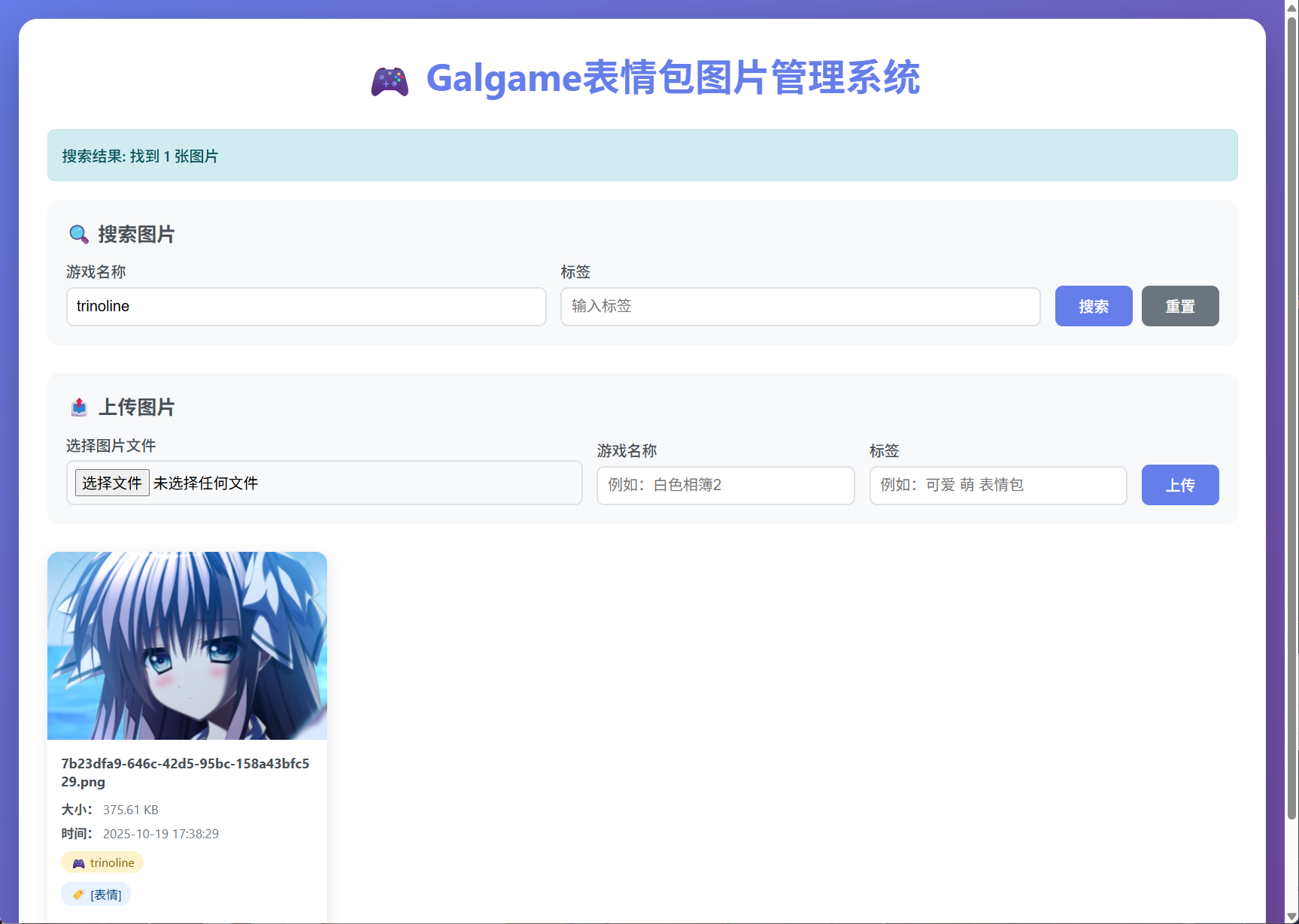
测试
我们上传一张,并且输入一些对应的文档信息
image-20251019173827213
搜索的测试也是没有任何问题的
image-20251019173838174
这样就为我们的项目添加了 ES 全文索引